- Published on
Learning Vim
- Authors

- Name
- Kevin van Zonneveld
- @kvz
In an attempt to familiarize myself with the unfamiliar, I decided to build a fun side-project in Ruby and Vim. Effectively learning a new language, framework, and editor.
Coming from Nano, Quanta, Eclipse PDT, TextMate, Netbeans; I found (Mac/g)Vim is big a step, and first two weeks you should not expect to be productive.
But after some persistence, I'm now faster in Vim than I was in my previous editors. Except for NetBeans still. Maybe that changes as I get better, but having an editor that understands your code is also a powerful thing. Scope-aware refactoring and jumping to declarations make that I keep both NetBeans and Vim around. Cause Vim on the other hand lets you navigate and hack on text like no other.
Investing in a tool like this pays off. For life.
Cause as long as computers can't read our minds, we're better off maximizing the efficiency of our typing. If your brain has to wait for your hands to transfer the message, you're just throwing away time & creativity flow.
Here are the resources that helped me get started with Vim.
Vim screencast tutorial (awesome series):
Other screencasts:
More resources:
- Vim Keyboard Cheat Sheet
- Vim Cheat Sheet
- Vim tips: Using tabs
- Use Vim like a pro
- Sync Vim Config across workspaces (on this blog)
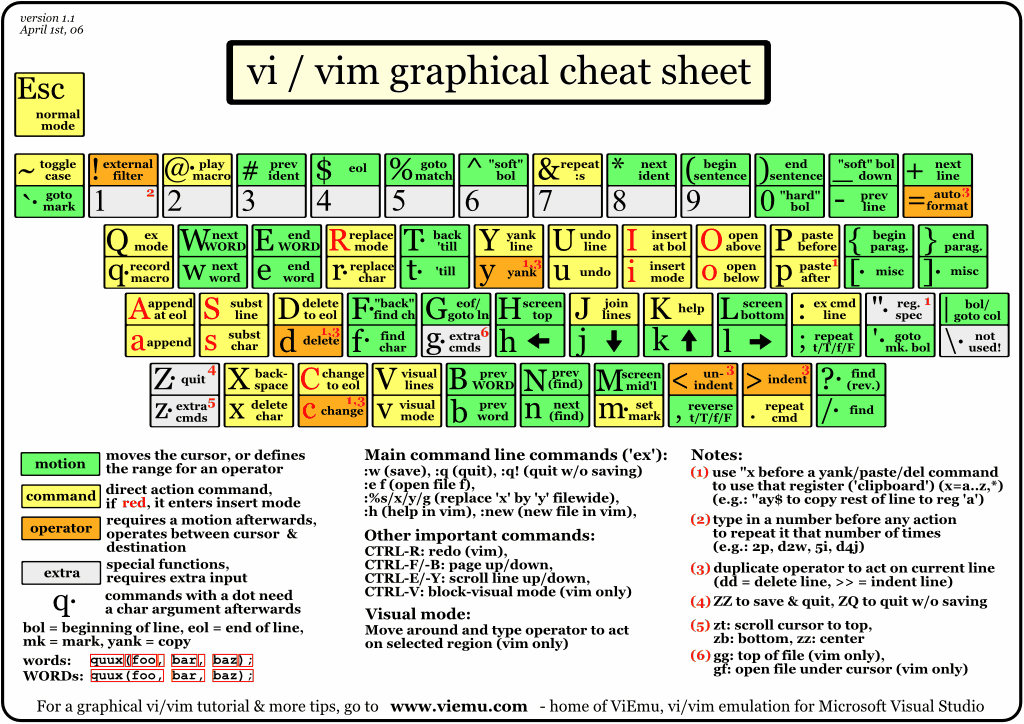
Keyboard Shortcuts
There are many Vim cheat-sheets out there, better than this one (see resources above). But still, I'll continuously log useful shortcuts here so I won't regress :)
Mode Switching
^[  exit mode
:   enter command mode

i   enter insert mode before cursor
a   enter insert mode after cursor
Command Mode
w [filename]  write file
e filename    edit file
e!            reload current file

<range>s      substitute
.             repeat commands
Normal Mode
This is the mode you should generally be in. Don't stick around in others longer than necessary.
Movement / Motions
j  move down
k  move up
h  move left
l  move right

0  move to line start
^  move to first char in line
$  move to last char in line

}  move down a paragraph
{  move up a paragraph

^d down a page
^u up a page

gg move to top
G  move to bottom

#  prev word like current
*  next word like current

%  move to matching closing/starting tag/comment/brace/statement
"  move to your last edit

b  back a word
w  to next word
W  to next WORD (space terminated, ignore e.g. commas)
e  to end of the current word
E  end of the current WORD (space terminated)
Manipulation
u          undo
x          delete character (and saves to clipboard)

c<motion>  change (enters insert mode)
y<motion>  copy (yank)
d<motion>  cut (delete) (and saves to clipboard)

p          paste after cursor
P          paste before cursor

<          unindent
>          indent
Search & Replace
/   start search down the document
?   start search up the document
^M  stop  search

n   move to next occurrence
N   move to prev occurrence

f   find symbol after cursor
F   find symbol before cursor
;   move to next occurrence of symbol
t   find until symbol after cursor

m<bookmark> create bookmark. e.g.: m1
`<bookmark> jump to bookmark (exact cursor position)
'<bookmark> jump to bookmark (beginning of line)
`.          jump to last edit (exact cursor position)
'.          jump to last edit (beginning of line)
:marks      show bookmarks
Ranges
% entire document
Combined
ctK                 change until next capital 'K'
yy                  copy (yank) line
d2e                 delete till the end of the second word

%s/name/kevin/g     change all occurrences of name to kevin in entire document
3,6 s/name/kevin/g  change all occurrences of name to kevin from line 3 to 6

D                   delete til end of line
Y                   copy (yank) til end of line

ct,                 change until ','
cf,                 change until & including ','

>7j                 indent this line & 7 next lines
<}                  unindent until next paragraph
3dd                 delete 3 lines (3x delete current line)
12x                 delete 12 characters
Insert Mode
^n                  Next autocomplete suggestion
^p                  Previous autocomplete suggestion
Shell Filtering
!            enter mode
!!<command>  apply filter on current line
!}sort       sort paragraph
:%!sort      sort entire file
!G           sort until bottom
Alright, that's all I got for now. What are your experiences with Vim?
Legacy Comments (6)
These comments were imported from the previous blog system (Disqus).

has subscribed you blog ,like you php article
He Kevin,
What editor do you use on the mac? Just vin in your terminal of macvim or something else?

@ primeminister: MacVim. And gVim on Ubuntu.
Hi KvZ,
How the hell can you ( efficiently ) administer linux (UNIX) servers without knowing vi ( or vim if available ) ? No graphic sessions possible on secured machine and Nano is not always available.
Note: On Windows you can gVIM too, kill Notepad
I have to agree with Tin Dalos; how did you (efficiently) admin linux boxes without vim?
Thanks for the article, might I also recommend the pdf from vimgeeks here: http://billodom.com/vim/vim...
Lots of really cool tips and tricks in there to really help with your VIM mastery.

I also had some trouble to learn vim. Each feature I learned, though kicked away another editor. It is today my favorite editor.
It surely pay off to learn a powerful tool like this.